
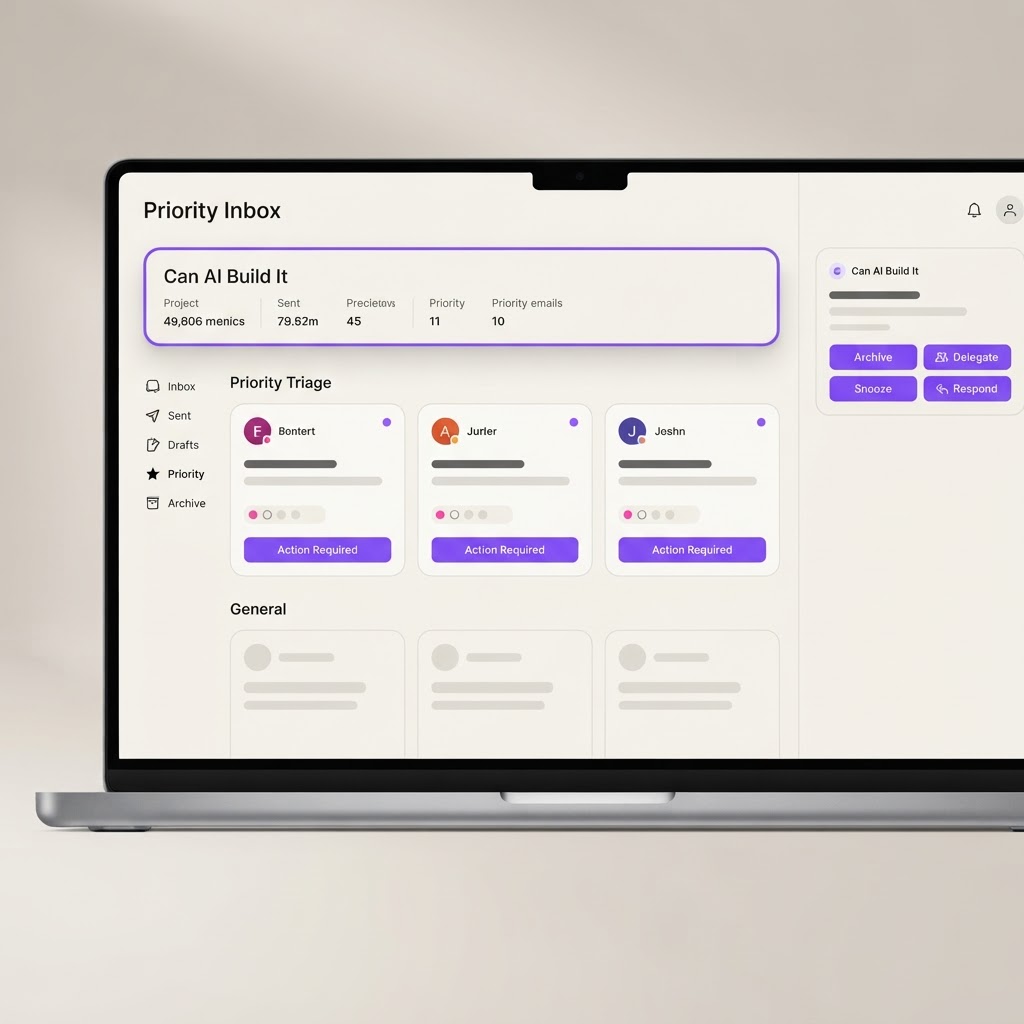
AI Email Triage and Priority Inbox
An AI-powered email triage tool that sorts your inbox by urgency, summarizes threads, drafts quick replies, and surfaces what actually needs your attention today.
The Prompt
Build an AI email triage and priority inbox web app. Features: 1) Email connection: connect via Gmail API or Microsoft Graph to pull in your inbox, 2) AI priority scoring: AI analyzes each email and assigns a priority score (Urgent, Important, Routine, FYI, Spam) based on sender, content, deadlines, and your past behavior, 3) Daily briefing: each morning, AI generates a summary of the 5-10 emails that actually need your attention today, 4) Thread summarization: long email threads are condensed into a 3-bullet summary with key decisions and open questions, 5) Quick reply drafts: AI generates context-aware reply drafts for routine emails that you can approve with one click, 6) Action item extraction: AI pulls out tasks, deadlines, and meeting requests from emails and surfaces them in a sidebar, 7) Sender insights: AI profiles your frequent senders and shows response time patterns, 8) Snooze and schedule: snooze emails to resurface at the right time, 9) Bulk actions: AI suggests emails safe to archive or batch-reply. Use a clean, focused inbox UI with priority badges, color-coded urgency, and a right sidebar for the daily briefing.
What You Can Build
- ✓Email connection: connect via Gmail API or Microsoft Graph to pull in your inbox,
- ✓AI priority scoring: AI analyzes each email and assigns a priority score (Urgent, Important, Routine, FYI, Spam) based on sender, content, deadlines, and your past behavior,
- ✓Daily briefing: each morning, AI generates a summary of the 5-10 emails that actually need your attention today,
- ✓Thread summarization: long email threads are condensed into a 3-bullet summary with key decisions and open questions,
- ✓Quick reply drafts: AI generates context-aware reply drafts for routine emails that you can approve with one click,
- ✓Action item extraction: AI pulls out tasks, deadlines, and meeting requests from emails and surfaces them in a sidebar,
- ✓Sender insights: AI profiles your frequent senders and shows response time patterns,
- ✓Snooze and schedule: snooze emails to resurface at the right time,
- ✓Bulk actions: AI suggests emails safe to archive or batch-reply. Use a clean, focused inbox UI with priority badges, color-coded urgency, and a right sidebar for the daily briefing
What's Hard
Required Screens
User Flow
Email connection: connect via Gmail API or Microsoft Graph to pull in your inbox, -> aI priority scoring: AI analyzes each email and assigns a priority score (Urgent, Important, Routine, FYI, Spam) based on sender, content, deadlines, and your past behavior, -> daily briefing: each morning, AI generates a summary of the 5-10 emails that actually need your attention today, -> thread summarization: long email threads are condensed into a 3-bullet summary with key decisions and open questions, -> quick reply drafts: AI generates context-aware reply drafts for routine emails that you can approve with one click, -> action item extraction: AI pulls out tasks, deadlines, and meeting requests from emails and surfaces them in a sidebar, -> sender insights: AI profiles your frequent senders and shows response time patterns, -> snooze and schedule: snooze emails to resurface at the right time, -> bulk actions: AI suggests emails safe to archive or batch-reply. Use a clean, focused inbox UI with priority badges, color-coded urgency, and a right sidebar for the daily briefing.
FAQ
Can AI build AI Email Triage and Priority Inbox?
AI app builders can handle this well. Gmail API and Microsoft Graph integration are well-documented. AI email classification, summarization, and reply drafting are proven LLM use cases. The priority scoring and daily briefing add genuine value. The main challenge is maintaining real-time sync with the email provider and handling large volumes, but for an MVP this is very manageable. Expect a working build in 1-2 weeks.
How hard is it to build AI Email Triage and Priority Inbox with AI?
It's rated Intermediate. Medium
What tools do I need to build AI Email Triage and Priority Inbox?
We recommend building it with Base44.
How long does it take to build AI Email Triage and Priority Inbox with AI?
See the build guide above for time estimates.
Related Builds
Not sure which tools to use?
Find your stack →New projects added weekly
Get the latest "can AI build it?" projects in your inbox.