
AI and UX Design: A Practical Workflow for Better Digital Experiences
AI and UX Design: How to Create Better Digital Experiences With Smarter Workflows
Design teams are moving beyond static screens. The most useful AI and UX design workflows combine human judgment, clear product thinking, and automation that removes repetitive work. A recent carousel from @avatarist.ai offers a visual starting point for understanding how designers can create stronger digital experiences without losing the craft behind them.
Featured creator: @avatarist.ai


Start with the experience, not the tool
The fastest way to make an AI-assisted project feel generic is to begin with a list of features. Strong digital products start with a real user problem: a confusing decision, a slow process, an inaccessible interaction, or a task people repeat every week. Before opening a design tool, write down who is struggling, what they are trying to accomplish, and what success looks like.
This framing gives AI a useful role. Instead of asking for “a modern dashboard,” give it constraints: the audience, the environment, the primary action, the information hierarchy, and the edge cases that matter. Better inputs produce more relevant concepts, while the designer remains responsible for deciding what deserves to exist.
Use visual references to accelerate alignment
Carousel-based references are valuable because they compress a design direction into a sequence of concrete examples. A team can discuss layout rhythm, typography, color, imagery, and interaction patterns before spending hours polishing a single screen. The goal is not to copy a visual style. It is to identify the principles that make the reference effective.
When collecting inspiration, annotate what you see. Is the interface calm because it uses generous spacing? Does it feel trustworthy because the hierarchy is predictable? Does a product feel premium because motion, contrast, and detail reinforce the same promise? These observations are more reusable than a moodboard made only of screenshots.
Build a system before building dozens of screens
A small design system creates leverage. Define type roles, spacing units, colors, button states, cards, form controls, and responsive behavior early. AI can help generate variations and documentation, but the system still needs a human owner who checks consistency and accessibility.
A practical workflow is to create one representative page first. Test the navigation, content density, empty states, loading states, errors, and mobile layout. Once the core patterns work, extend them across the product. This prevents a common failure mode: producing many attractive screens that do not behave like one coherent experience.
Treat AI as a collaborator, not an autopilot
AI is especially useful for exploration. It can suggest alternative information architectures, rewrite confusing labels, generate content placeholders, compare interaction patterns, and identify scenarios a team has overlooked. It can also turn a rough product brief into a starting wireframe or implementation plan.
But generated output should pass through deliberate review. Ask whether the interface makes the next action obvious, whether the copy sounds like a real person, and whether the design works for users with different abilities, devices, and levels of familiarity. Speed is valuable only when it gives the team more time for judgment.
Validate the moments that matter
Do not wait until the entire product is polished to test it. Choose the highest-risk flow, signup, search, checkout, onboarding, or the central creation task, and put a clickable version in front of representative users. Watch where people hesitate. Their behavior will often reveal problems that a design critique misses.
Measure more than visual preference. Useful signals include task completion, time to first success, error recovery, comprehension of labels, and whether users can predict what happens next. Those findings should feed the next design iteration, whether the change is made manually or with AI support.
Make the workflow inclusive and easy to hand off
Accessibility should be part of the first concept, not a final compliance pass. Check color contrast, keyboard focus, readable type sizes, touch-target dimensions, motion preferences, and the clarity of error messages while the system is still flexible. AI can help identify likely issues or generate test cases, but it cannot replace testing with people who use assistive technology or have different access needs.
A good handoff also explains the reasoning behind the interface. Record the user problem, the important states, the content rules, and the decisions that were intentionally not made. This context helps developers preserve the experience in production and gives future designers a reliable foundation instead of another set of disconnected screens.
A repeatable AI and UX design workflow
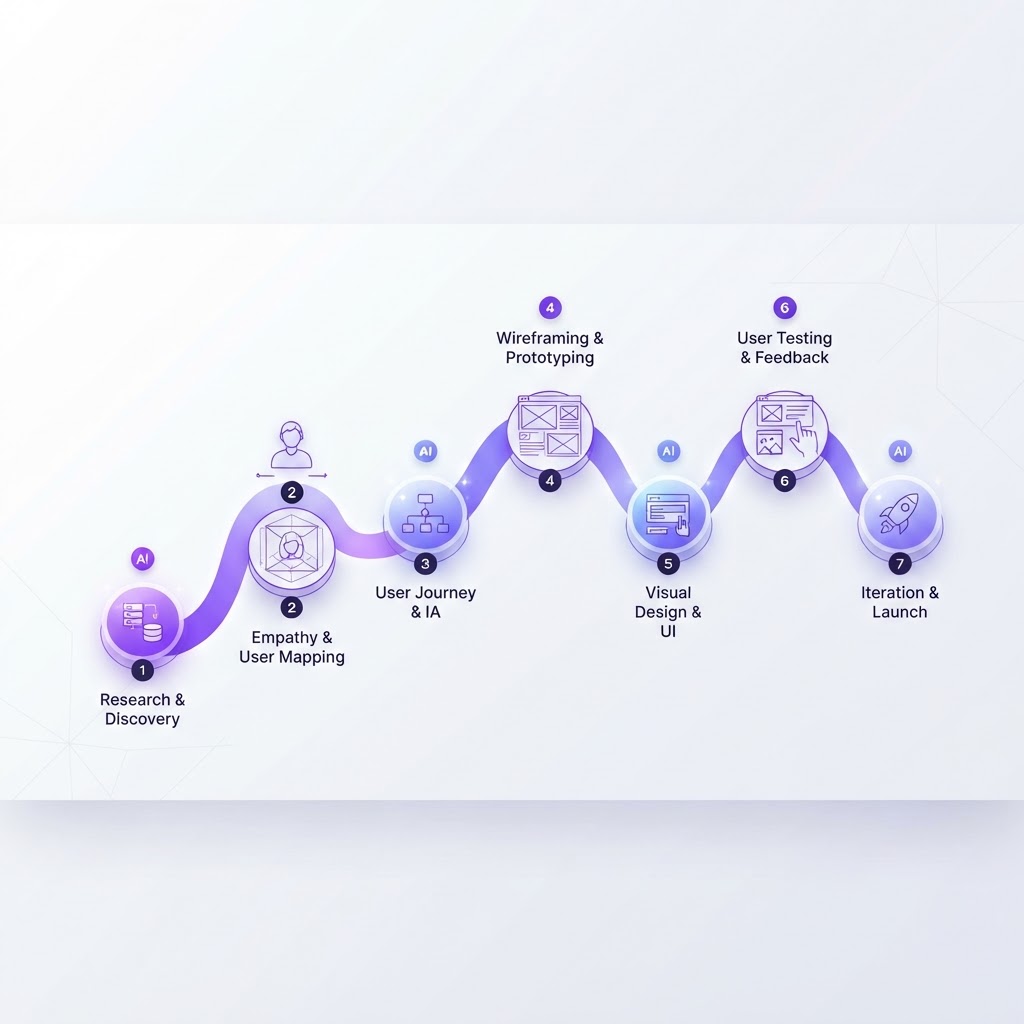
A strong process can be simple: define the user problem, gather focused references, map the journey, establish a small visual system, generate alternatives, prototype the riskiest flow, test with users, and document the decisions. Each step creates context for the next one.
The best result is not the most dramatic screen. It is a product that feels clear, useful, and intentional. Use AI to widen the range of possibilities and reduce mechanical effort, then use design expertise to select, refine, and validate the experience.
For more visual design workflows and practical product-building ideas, explore NewForm: Creative Hub. The original carousel is available on Instagram.
. Visual reference and featured work by @avatarist.ai.
Find Your Stack
Discover the perfect design tools for your workflow.
Take the 60-second quizNewForm Studio
Turn your designs into professional mockups instantly.
Open StudioMore from NewForm

Essential UX Terms Every Designer Should Know (2026 Guide)
Six UX terms that define the design process, from user research to conversion rate. A practical glossary for designers who want to speak the language of UX.
7 min read · Sep 24, 2026

How to Train Your Designer Eye: 10 Visual Details Most People Miss
Great designers see things others don't. Here are 10 visual details that separate professional-level design work from amateur attempts, and how to train your eye to notice them.
7 min read · Sep 12, 2026